> For the complete documentation index, see [llms.txt](https://product-tabs-guide.ddshopapps.com/llms.txt). Markdown versions of documentation pages are available by appending `.md` to page URLs; this page is available as [Markdown](https://product-tabs-guide.ddshopapps.com/show-tabs-on-the-product-page.md).
# Show tabs on the product page
## For Online Store 2.0
If your theme is an [Online Store 2.0](https://help.shopify.com/en/manual/online-store/themes/managing-themes/versions), please [add an app block](https://help.shopify.com/en/manual/online-store/themes/theme-structure/extend/apps#app-blocks) to your product template via Theme Editor.
### Show only 1 tab group on the product page
**If you only have 1 tab group**: Add the App block to the product template and leave it blank.
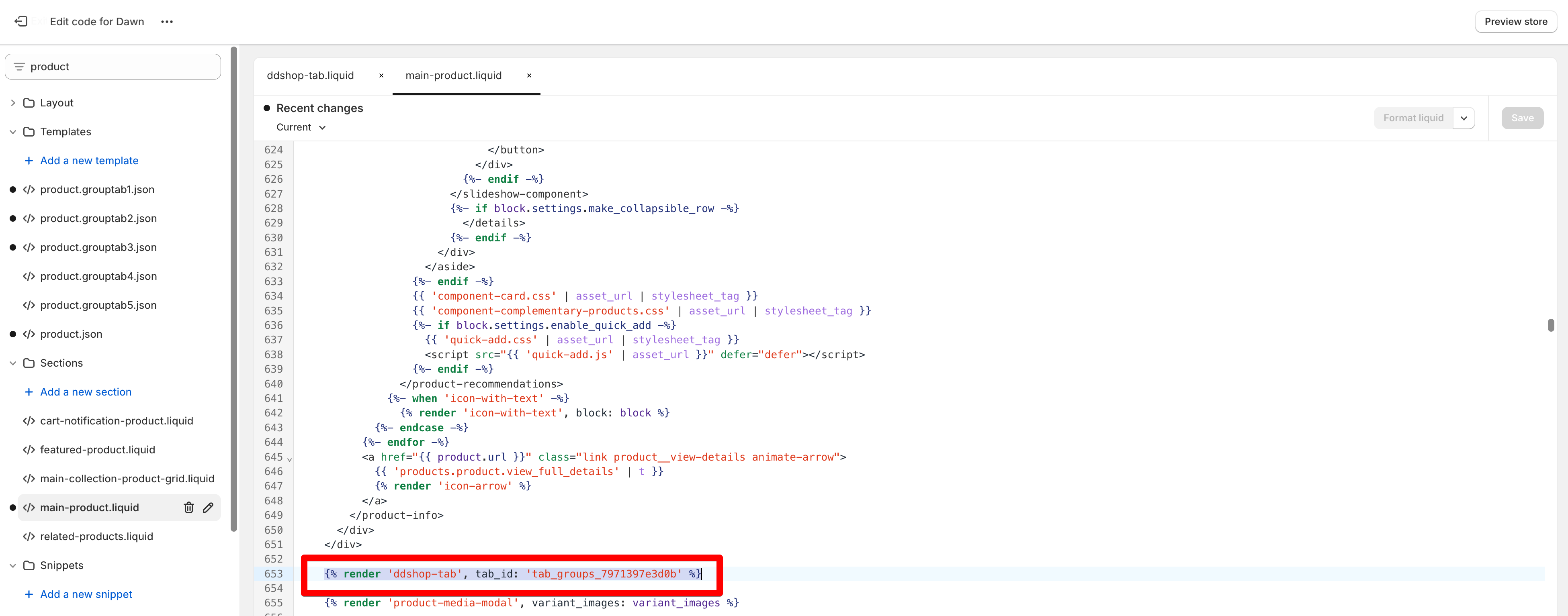
**If you have multiple tab groups**:
* You need to copy the Tab group ID and paste it into the App block.
* Or use the tab group filter to specify exactly which products display the tab group
{% if shop.metafields['storeify_tabs_dev_1'] %}
{% assign ifyGroupsTab = shop.metafields['storeify_tabs_dev_1'] %}
{% assign groupstab_settings = ifyGroupsTab.groupstab_settings %}
{% for tabGroup in ifyGroupsTab %}
{% if tabGroup[0] != 'groupstab_settings' %}
{% if tab_id == null or tab_id == '' or tabGroup[0] == tab_id %}
{% if tabGroup[1].status == 1 %}
{% assign langArr = tabGroup[1].lang %}
{% assign viewbyLang = 0 %}
{% if langArr == empty %}
{% assign viewbyLang = 1 %}
{% else %}
{% if tabGroup[1].lang_contains == '0' %}
{% unless langArr contains request.locale.iso_code %}
{% assign viewbyLang = 1 %}
{% endunless %}
{% else %}
{%if langArr contains request.locale.iso_code %}
{%assign viewbyLang = 1 %}
{%endif %}
{% endif %}
{% endif %}
{% if viewbyLang == 1 %}
{% liquid
assign showTab = 0
if request.page_type == 'product'
if tabGroup[1].show == 1 or tabGroup[1].show == 4
assign showTab = 1
endif
if tabGroup[1].show == 2
assign productArr = tabGroup[1].products
assign currentId = product.id | append: ""
if productArr contains currentId
assign showTab = 1
endif
endif
if tabGroup[1].show == 3
assign collectionIds = product.collections | map:'id'
for colItem in collectionIds
assign colItemstring = colItem | append: ""
if tabGroup[1].collections contains colItemstring
assign showTab = 1
endif
endfor
endif
endif
if tabGroup[1].show == 5 and request.page_type == 'page'
assign showTab = 1
endif
%}
{% if showTab == 1 %}
{% assign classGrouptab = 'storeify_tabs_group' | append: " ify_taps_" | append: tabGroup[1].tab_style %}
{% assign classIcon = 'ify-item-glyph' %}
{% if tabGroup[1].allow_multiple_open != '0' %}
{% assign classGrouptab = classGrouptab | append: " ify_multiple_open" %}
{% endif %}
{% if tabGroup[1].glyph_item != '1' %}
{% assign classGrouptab = classGrouptab | append: " ify_taps_glyphs_align_" | append: tabGroup[1].glyphs_align | append: " ify_taps_glyphs_" | append: tabGroup[1].glyph_item %}
{% endif %}
{% if tabGroup[1].is_accordion == '1' %}
{% assign classGrouptab = classGrouptab | append: " ify-accordion-view" %}
{% endif %}
{% if tabGroup[1].tabs %}
<div id="{{ tabGroup[0] }}" class="out-tab-group ify-isloading" data-tab-group-id="{{ tabGroup[0] }}">
<style id="style_{{ tabGroup[0] }}">
{{ tabGroup[1].styles_raw }}
{{ tabGroup[1].custom_css }}
</style>
{% if tabGroup[1].is_default == 0 %}
<div class="{{ classGrouptab }} storeify-tab-style-custom" data-tab-group-id="{{ tabGroup[0] }}">
{% assign listTab = tabGroup[1].tabs %}
{% for tabItem in listTab %}
{% assign classActive = '' %}
{% assign classLast = '' %}
{% if forloop.first %}
{% assign classActive = 'ify-active' %}
{% endif %}
<!-- accordion_default_view -->
{% if tabGroup[1].is_accordion == '1' and tabGroup[1].accordion_default_view == '2' %}
{% assign classActive = '' %}
{% elsif tabGroup[1].accordion_default_view == '3' %}
{% assign classActive = 'ify-active' %}
{% endif %}
{% if forloop.last %}
{% assign classLast = 'last-child' %}
{% endif %}
<div class="ify-tap-title ify-tap-title-{{ tabItem.tab_id }} {{ classActive }} {{ classLast }}" data-target="ify-tap-content-{{ tabItem.tab_id }}" data-tab-uuid="{{ tabItem.tab_id }}" data-tab-title="{{ tabItem.tab_head }}" data-tab-index="{{ forloop.index0 }}">
<label>{{ tabItem.tab_head }}</label>
<span class="{{ classIcon }}"></span>
</div>
<div class="ify-tab-content ify-tab-content-type-{{ tabItem.tab_type }} ify-tap-content-{{ tabItem.tab_id }} {{ classActive }} {{ classLast }}" id="ify-tap-content-{{ tabItem.tab_id }}">
{% case tabItem.tab_type %}
{% when '1' %}
{{ tabItem.tab_value }}
{% when '2' %}
{{ product.description }}
{% when '3' %}
<!-- begin snippet -->
{% case tabItem.tab_value %}
{% when '1' %}
<!-- Start of Judge.me code -->
{% assign has_legacy = false %}
{% if product.metafields.judgeme.widget.size > 20 %}
{% assign has_legacy = true %}
{% endif %}
<div style='clear:both'></div>
<div id='judgeme_product_reviews' class='jdgm-widget jdgm-review-widget' data-product-title='{{ product.title | escape }}' data-id='{{ product.id }}' data-product-id='{{ product.id }}' data-widget='review' data-auto-install='false' data-shop-reviews-count='{{ shop.metafields.judgeme.shop_reviews_count | default: 0 | escape }}' data-entry-point='review_widget.js' data-entry-key='review-widget/main.js'>
{% if has_legacy %}
<div class='jdgm-legacy-widget-content' style='display: none;'>{{ product.metafields.judgeme.widget }}</div>
{% endif %}
</div>
{% if product.metafields.judgeme.review_widget_data %}
<script>jdgm.data ||= {}; jdgm.data.reviewWidget ||= {}; jdgm.data.reviewWidget[{{ product.id }}] = {{ product.metafields.judgeme.review_widget_data }}</script>
{% endif %}
<!-- End of Judge.me code -->
{% when '2' %}
<div id="looxReviews" data-product-id="{{product.id}}" class="loox-reviews-default"></div>
{% when '3' %}
<div class="trustshop trustshop-review-wrap trustshop-storeify" id="trustshop-review"></div>
{% when '4' %}
<div id="mag-product-review" class="mag-product-review-storeify" data-product="{{ product.id }}" data-product-handle="{{ product.handle }}"></div>
{% when '5' %}
<div class="alireviews-review-box"></div>
{% when '6' %}
<div class="AirReviews-Widget AirReviews-Widget--Block"></div>
{% when '7' %}
<div class="easyreviews-product-reviews"></div>
{% when '8' %}
<div id="bundle-product_reviews"></div>
{% when '9' %}
<div class="custom-vstar-review-widget" style="width:100%"></div>
{% endcase %}
<!-- end snippet -->
{% when '4' %}
{% render 'ddshop-custom-liquid' %}
{% when '5' %}
{% assign tabRecommendation = tabItem.tab_value | split: "-" %}
<div class="ify_product-recommendations ify-grid-{{ tabRecommendation[1] }}" data-url="{{ routes.product_recommendations_url }}?section_id=ddshop-product-recommendations&product_id={{ product.id }}&limit={{ tabRecommendation[0] }}" data-limit="{{ tabRecommendation[0] }}"></div>
{% when '6' %}
{{ tabItem.tab_value }}
{% when '7' %}
{{ tabItem.tab_value }}
{% when '8' %}
{% if tabItem.tab_value %}
{% assign tabMetafield = tabItem.tab_value | split: "." %}
{% assign tabMetafieldObj = product.metafields[tabMetafield[0]][tabMetafield[1]] %}
{% if tabMetafieldObj.type contains "file_reference" %}
{% if tabMetafieldObj.list? %}
<div class="ify_list_downloads">
{% for file in tabMetafieldObj.value %}
{% assign file_url = file.url %}
{% unless file_url %}
{% assign file_url = file | file_url %}
{% endunless %}
{% assign raw_filename = file_url | split: '/' | last | split: '?' | first %}
{% assign clean_filename = raw_filename | replace: '%20', '-' %}
<a class="ify_item_download" href="{{ file_url }}" download="{{ file.alt | default: clean_filename }}">
{{ file.alt | default: clean_filename }}
</a>
{% endfor %}
</div>
{% else %}
{% assign file_url = tabMetafieldObj | file_url %}
{% assign raw_filename = file_url | split: '/' | last | split: '?' | first %}
{% assign clean_filename = raw_filename | replace: '%20', '-' %}
<a class="ify_item_download" href="{{ file_url }}" download="{{ file.alt | default: clean_filename }}">
{{ file.alt | default: clean_filename }}
</a>
{% endif %}
{% else %}
{{ product.metafields[tabMetafield[0]][tabMetafield[1]].value }}
{% endif %}
{% endif %}
{% endcase %}
</div>
{% endfor %}
</div>
{% else %}
<div class="{{ classGrouptab }} storeify-tab-style-description" data-tab-group-id="{{ tabGroup[0] }}">
{{ product.description }}
</div>
{% endif %}
<script id="script_{{ tabGroup[0] }}">
document.addEventListener('DOMContentLoaded', function() {
var ify_settings_{{ tabGroup[0] }} = {id:'{{ tabGroup[0] }}'}
ify_settings_{{ tabGroup[0] }}.params = {
tab_style: {{ tabGroup[1].tab_style | json }},
accordion_default_view: {{ tabGroup[1].accordion_default_view | json }},
allow_multiple_open: {{ tabGroup[1].allow_multiple_open | json }},
glyph_item: {{ tabGroup[1].glyph_item | json }},
glyphs_align: {{ tabGroup[1].glyphs_align | json }},
is_accordion:{{ tabGroup[1].is_accordion | json }},
is_default:{{tabGroup[1].is_default}}
}
{% if tabGroup[1].show == 4 %}
ify_settings_{{ tabGroup[0] }}.conditions = {{ tabGroup[1].conditions | json }}
{% endif %}
var tabGroupify_{{ tabGroup[0] }} = new storeifyGroupTabs(ify_settings_{{ tabGroup[0] }},storeifyTabs.configs,storeifyTabs.product);
tabGroupify_{{ tabGroup[0] }}.createGroupTabs()
});
</script>
</div>
{% endif %}
{% endif %}
{% endif %}
{% endif %}
{% endif %}
{% endif %}
{% endfor %}
{% endif %}